

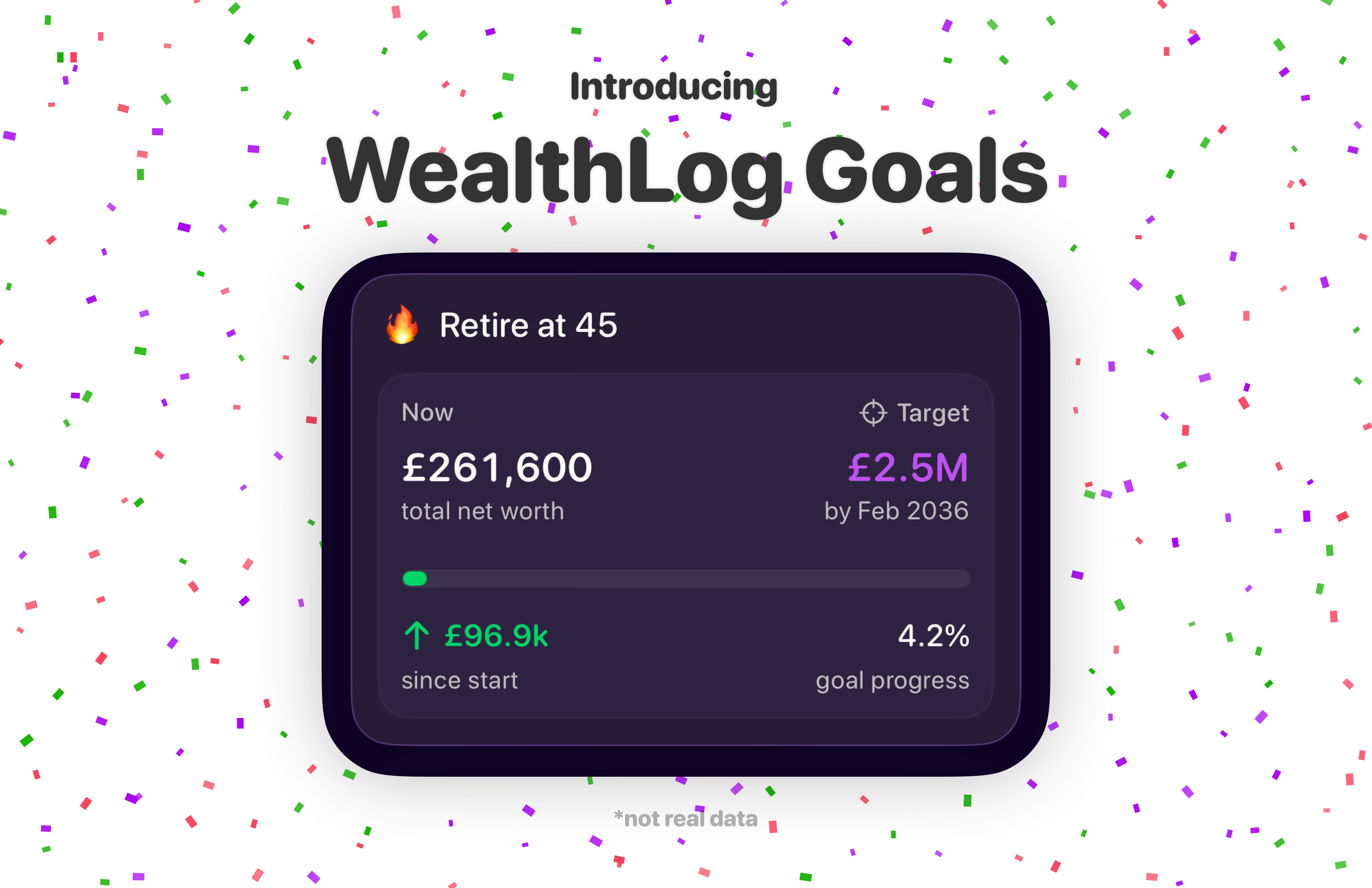
I shipped WealthLog as a net worth tracker — a way to connect all your accounts, see your full financial picture in one place and track how things change over time. The next step I wanted to tackle was adding the ability to set financial goals. Not just “here’s where you are” but “here’s where you’re trying to get to, here’s how far along you are and here’s what’s helping you progress.”
This past week I shipped ‘Goals’ on WealthLog. Here’s what it looks like.
Choosing A Goal
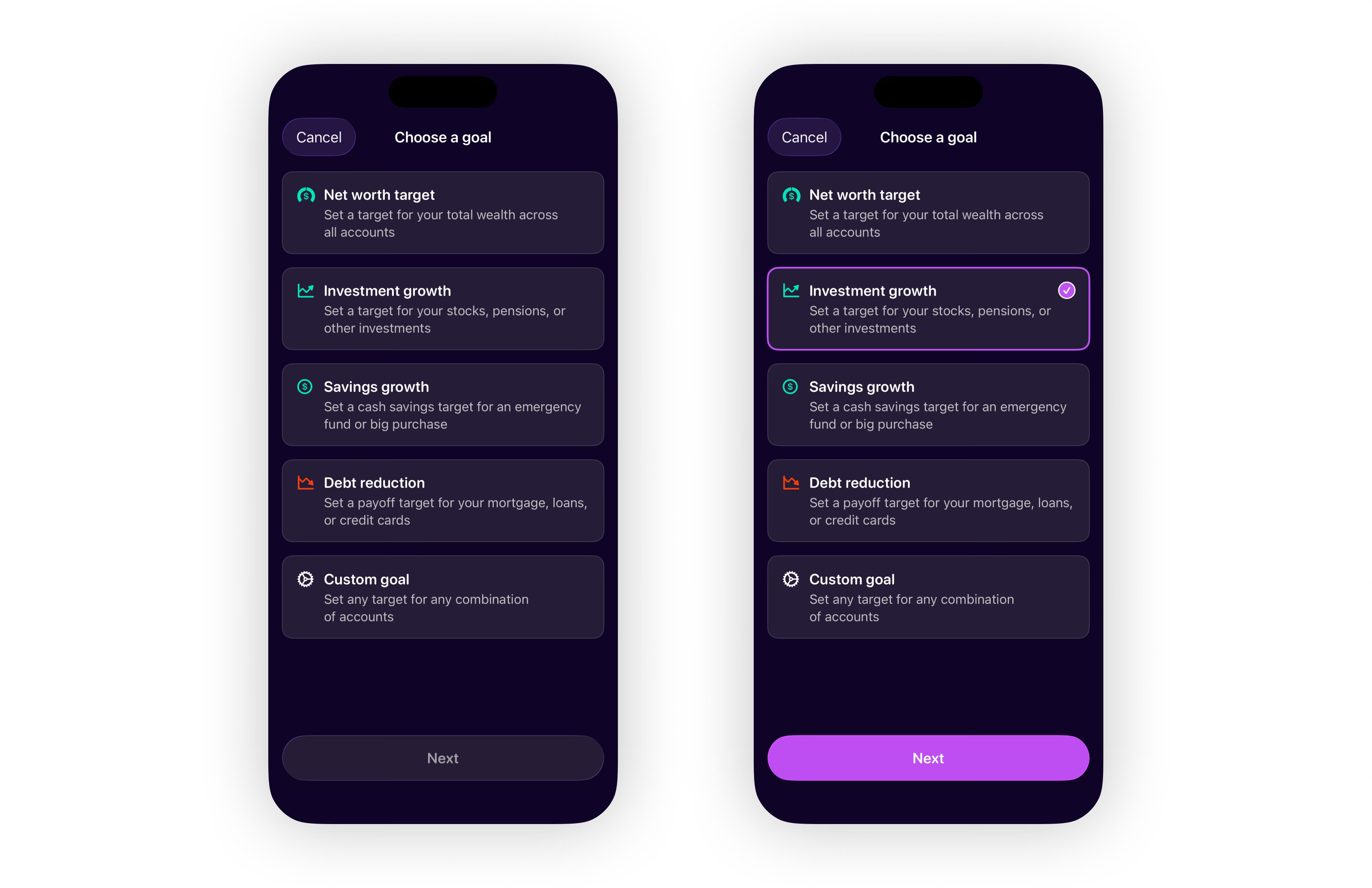
When you create a new goal, you initially pick from five types:
Net worth target — a target for your total wealth across all accounts
Investment growth — for stocks, pensions, or other investments
Savings growth — for an emergency fund or saving toward a big purchase
Debt reduction — a payoff target for your mortgage, loans, or credit cards
Custom goal — any combination of accounts you choose
These goal types are actually set up in the exact same way under the hood, but I wanted users to get a feel for different types of goals they could create at first interaction.
Net worth goals automatically include all your accounts and stay in sync if you add or remove accounts later.
Debt reduction goals help you track towards lowering your overall debt, maybe for all your outstanding credit cards or a single student loan you want to pay off.
Custom goals are the most flexible — useful if you want to track something with a very specific combination of accounts. Maybe you want to track liquid asset growth across just your stocks and cash accounts while ignoring a pension or property as these are not very liquid. I wanted to leave an option for users to be creative and custom goals are very flexible.
Setting Up A Goal
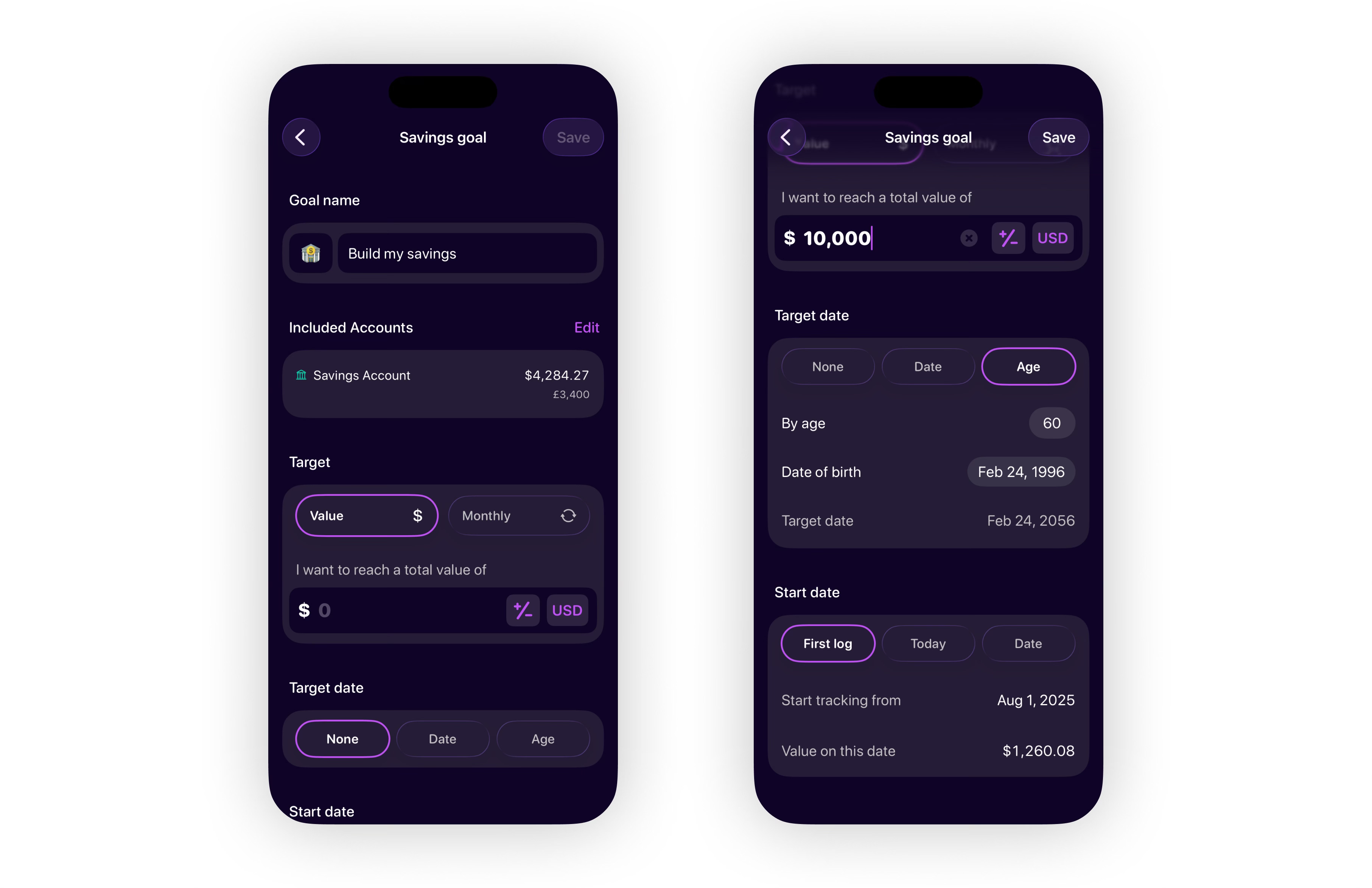
Once you’ve picked a goal type, you can name the goal, select which accounts to include, and set your target. There are two target modes: a one-time value target (e.g. reach £50,000 total) or a monthly recurring target (e.g. add £500 every month). The recurring option is more useful for building habits — more on that below.
Target dates can be set as a specific date or by age. If you enter your date of birth and set a target age — say 60 — WealthLog works out the date automatically. Useful for retirement-type goals without having to do the maths yourself.
You can also set a start date for the goal. Either from today, so it starts at your current account values, or from an earlier date — right back to the first log recorded for those accounts. This lets you count progress you’ve already made if that’s relevant to the goal.
Tracking Your Goals
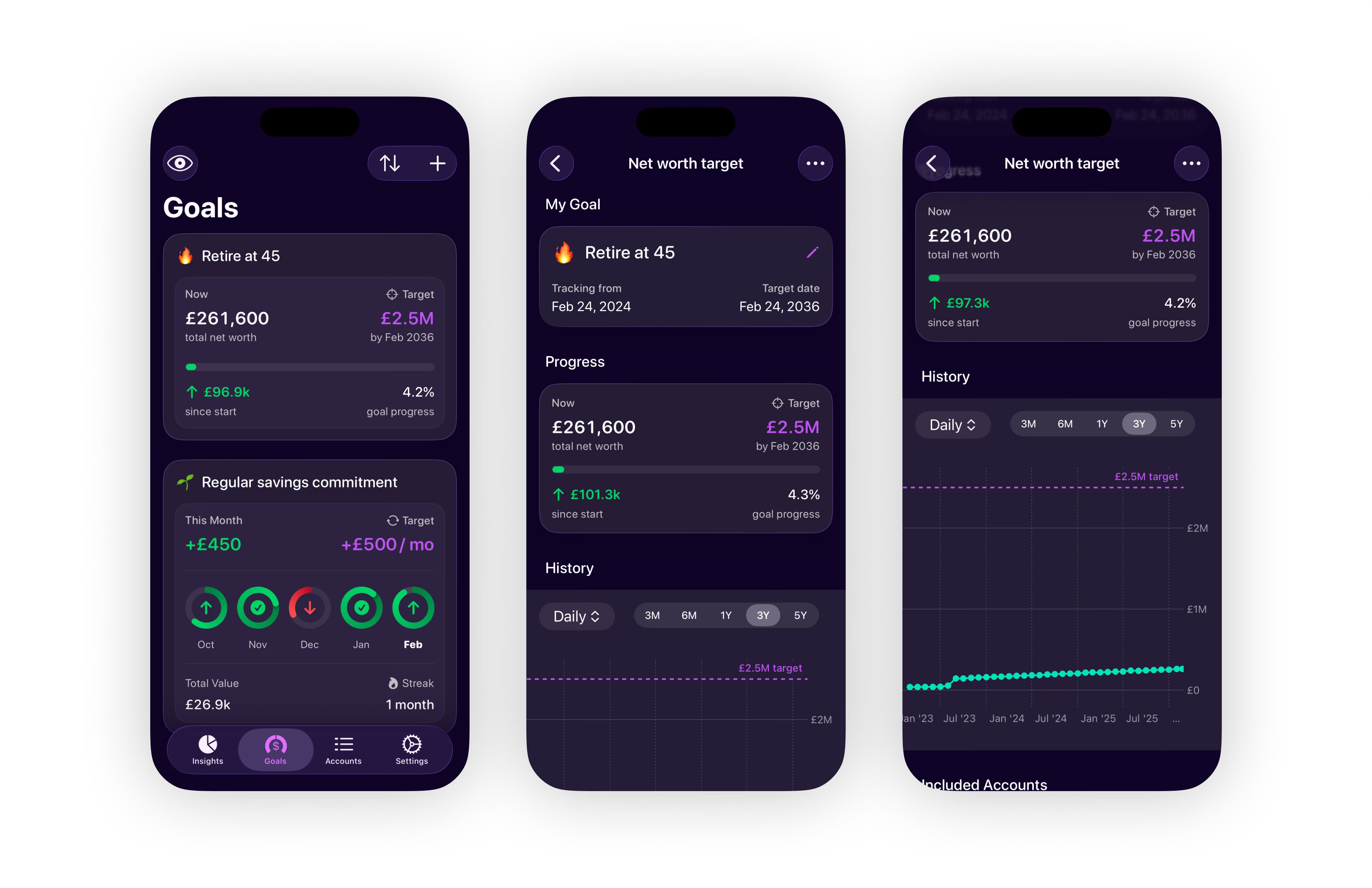
All your goals sit on a dedicated Goals screen. Each card shows your current value, your target and your progress. You can have as many goals as you want and sort them by due date, target amount or current progress.
Tapping into a goal opens a detail screen with charts and a breakdown of the included accounts and their individual contributions — useful when a goal spans multiple accounts and you want to see what’s actually driving the movement.
Monthly Goals UI Challenge
The monthly recurring goal type was the trickiest part to get right, specifically the UI for showing month-by-month progress within a summary goal card. It needed to stay compact and provide useful information at a glance.
Initially I thought of a bar chart, with one bar for each month showing positive and negative gain. It worked but the problem I found was that negative values on a bar chart in a small space are awkward — a big negative month distorts the scale and makes the positive months look flat by comparison.
I ended up taking a different approach, using a circular progress ring for each month — similar to Apple’s fitness rings. A ring can represent positive and negative values through direction (clockwise for progress) and colour (green for months you hit your target, red for months you fell short). It’s more compact and handles the full range of values without the skewed scale problem.
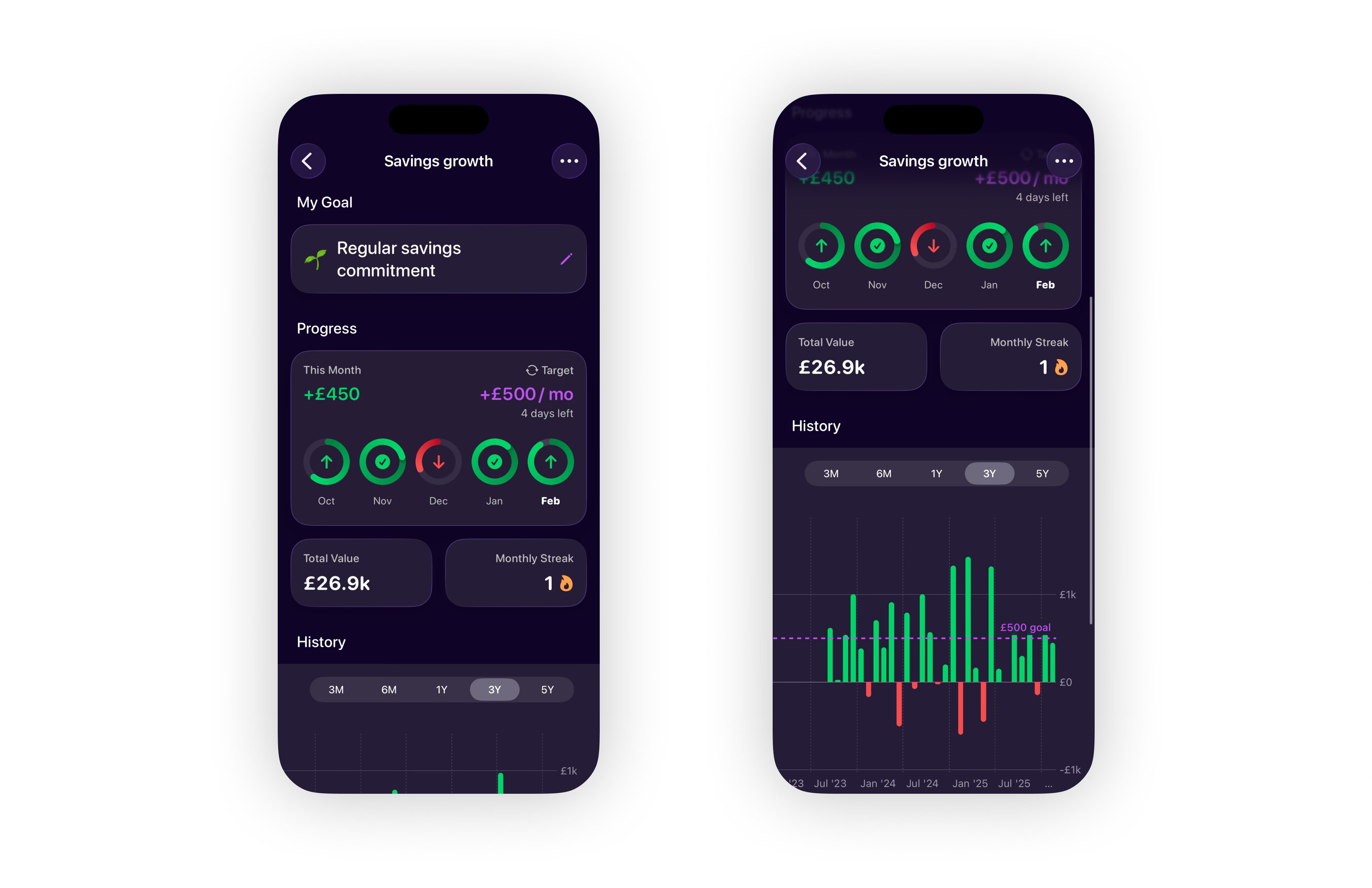
To be totally honest, I’m not sure I’m happy with this UI but I think it works well enough for a v1 and solves the core problem of handling varying positive and negative results.
A Lesson In Scope Creep
The original plan for this feature was much simpler: a goal configuration screen and a list of goal cards. After sharing early designs with a few people, it was clear a goal detail screen with charts was worth adding — a progress bar alone doesn’t give you much to work with when you want to understand what’s actually driving movement. So I pushed the release back and built that first.
Then while building, I kept coming back to monthly recurring goals. An overall net worth target is useful, but it doesn’t give you much reason to check in regularly. A monthly savings commitment does — you can see your progress rings build up, hit your target and keep a streak going. That kind of feedback loop is what turns a tracker into something you actually use consistently. So that went in too, along with the extra calculation logic it needed for goals spanning multiple account combinations.
Scope creep has a compounding effect that’s easy to underestimate. Every feature added to a release isn’t just more build time — it’s more test cases, more edge cases, more surface area for bugs to hide. This release had more of all three than I’d have liked. The lesson I keep relearning: ship small and fast. Getting something in front of users early is better for gathering feedback, and honestly better for staying sane. Going forward I want to be much more deliberate about keeping releases tight rather than waiting until something feels fully established. WealthLog Goals is a good v1, but it could have been in user’s hands a lot sooner if I’d remembered age-old lessons on scope creep.
What Next For WealthLog?
I’m glad I’ve shipped Goals. Hopefully it will add value by helping to motivate people towards more regular financial tracking and growing their wealth. It’s also a fun tool to be able to customize WealthLog a bit more to your unique life goals. But how do you choose an appropriate financial goal? That’s the question I’d like to address with future features, so more on that soon... For now, if you’ve got any thoughts on this or on the existing app please do get in touch.
That’s all for this week. Thanks for reading.
— Mike